How to edit a founder update video for investors
Record the update in one take, pick a style that handles numbers, and Clypmint cuts it down and puts the figures on screen. In Personal brand, a big number grows as you say it and the camera leans in to meet it. In YouTube, counts, titles and key lines land on their word.
Starter is $29 a month for 120 editing credits. Pro is $89 a month for 400 editing credits. Operator is $189 a month for 900 editing credits. Agency is $499 a month for 2400 editing credits.
Why this is hard
- Investors get a 6-minute unedited monologue and watch 40 seconds of it.
- The numbers are in your voice and nowhere on the screen.
- You are going to record another one next month, and the month after.
How to do it, step by step
- Record one take
Say the update straight through. Do not stop to fix mistakes.
- Pick a style that handles numbers
Personal brand grows a big number and leans in on it. YouTube puts counts and titles on screen for a longer update.
- Let it cut and place the figures
Clypmint removes the restarts and the dead air, and places the number graphics on the beats where you say them.
- Direct it
Tell it to lead with the headline number, or to cut the first thirty seconds.
- Send it
Download and send the file. Use the same style next month and the update becomes a series.
Which styles suit this
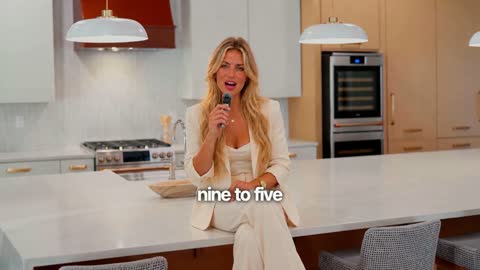
Personal brand
Captions on the chest and push-ins on your numbers. Your face is the film.
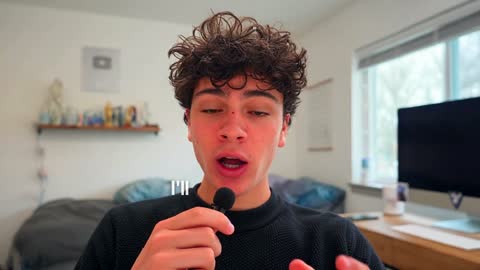
YouTube
Long videos with clean subtitles, counts and titles.
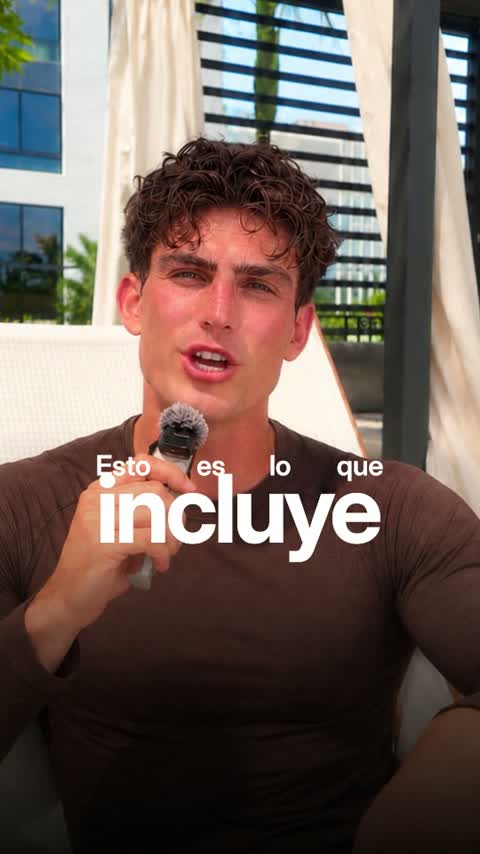
Luxe
Big set words and framed cards. Polished and premium.
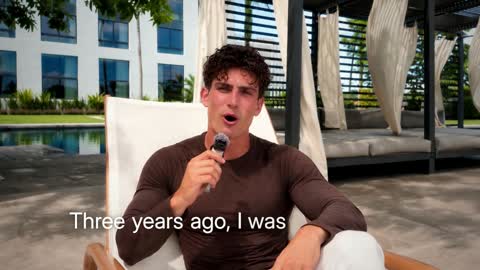
Documentary
A cinematic interview in chapters, with calm scenes of what you name.
Or browse every Clypmint style.
What Clypmint will not do here
Clypmint reads your footage, not your spreadsheet. It puts on screen the numbers you say out loud. It does not connect to your metrics.
Questions
Can it pull numbers from my dashboard?
No. It works from your footage. It puts up the figures you say in the recording.
How long should a founder update be?
Shorter than you recorded it. Clypmint cuts the dead air and the restarts, so a 6-minute take usually lands closer to 3.
Can I keep the same style every month?
Yes. Pick the same style each time and the series holds together.
What does Clypmint cost?
Starter is $29 a month for 120 editing credits. Pro is $89 a month for 400 editing credits. Operator is $189 a month for 900 editing credits. Agency is $499 a month for 2400 editing credits. You are billed monthly and you can cancel any time.
Is there a free trial?
Sign up and choose a plan to start creating. Plans start at $29 a month. Upload your footage, choose a style, and review your finished video. No watermark. Cancel any time.
Other jobs
Send us the recording.
Sign up and choose a plan to start creating. Plans start at $29 a month. Upload your footage, choose a style, and review your finished video. No watermark. Cancel any time.